Sunday, November 22, 2009

CleanApp 3.2.1


About CleanApp
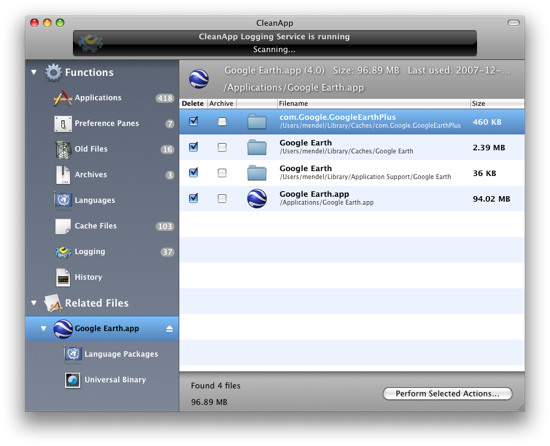
Don’t get lost! Have you ever unsuccessfully tried to get rid of a program and all the files that came with it? Are logfiles, plists and caches cluttering folders and volumes on your Mac? Don’t you ask yourself from time to time where the multiple gigabytes of hard disk space continuously vanish to? Uninstall, archive, backup and analysis… CleanApp analyzes, archives and removes applications and on your Mac, complete with all relevant files. Efficient.

Our brand-new version 3 of CleanApp now gained in power and efficiency: requiring less memory and CPU than the predecessor, CleanApp 3 reliably tracks the most complex installations and quickly presents the user with a comprehensive listing of all information gathered so far. Many more features.

WHAT’S NEW
Version 3.2.1:


* Several localizations updated
* Logging installation problems solved
* Now saves configured column width
* 10.4 Trash scanning – Problem with showing the window solved

Size 17.6 Mb

aTV Flash 4.0.1


Do more with your AppleTV. Get aTV Flash. It's a quick software upgrade that will take your AppleTV to a whole new level. With aTV Flash on board your AppleTV's true potential will be unleashed.

Don't worry about the technical details - aTV Flash is simple to use and safe for your AppleTV. The software installs in a snap and doesn't require any physical changes to the AppleTV. Best of all, aTV Flash will NOT void your warranty. In fact, you can easily remove it at any time, if you can ever bear to part with it.

Minimum Requirements:
- AppleTV running software v3.0 or later
- Mac running OS X v10.4.9 or later
- 300MB available disk space
- USB Flash Drive - 256MB or larger
- Internet connection
- Looking for the PC version?
 

YouTube Video Grabber - 2.0


Product Description:
YouTube Video Grabber is a Shareware Mac OS X program that will resolve the internet address for YouTube flash video files from YouTube web page URLs and allow users to download and convert the flash video files to different formats (including Quicktime).
What's new in this version:

* Changed the "Video Information" pane to "Video Preview" pane.
* Allows for conversion of flash video files to .mov, .mp4, .avi, .rm, and .wmv.

Operating System Requirements:

This product is designed to run on the following operating systems:

* Mac OS X 10.5 Intel
* Mac OS X 10.5 PPC
* Mac OS X 10.4 Intel
* Mac OS X 10.4 PPC

Key integrated + Serial

Saturday, November 21, 2009

DiskWarrior 4.2.909


Product Description:
DiskWarrior 4.2 maintain, repair, recover system disk / drive data

The Essential Mac Disk Utility
Everything just disappeared after your Mac went haywire. All your work documents. The music you most enjoy. The movie of your kid's first steps. It's your life and it's gone. Don't panic! DiskWarrior will find your documents, photos, music and any other files when disaster strikes and things go missing.
Perhaps you've tried to open a document and all that happens is a color wheel that spins and spins and spins… Or when your Mac starts up, all you get is a blinking question mark… Or you were in the middle of editing a movie and now your external hard disk isn't on the desktop… Or your MP3s won't play... Or every time you look through your photos, your Mac crashes. DiskWarrior gets you back up and running fast!

Mac System Requirements

DiskWarrior 4 supports any Mac OS Standard (HFS) or Mac OS Extended (HFS Plus) disk including RAID volumes, journaled disks, case-sensitive disks, FileVaults, Time Machine backups and iPods.
DiskWarrior requires a G3 Mac or better (such as a G4, G5 or any Intel processor) with built-in FireWire and a minimum 256 MB RAM (512 MB recommended) to start up and run from the DiskWarrior CD regardless of what operating system is installed on the disk to be rebuilt.
NOTE: The current DiskWarrior CD cannot start up the new Mac Pro and Xserve models introduced on 01/08/2008 and the MacBook Air introduced on 01/15/2008. A new CD revision will be released soon.
To install, you must be started from Mac OS X 10.3.9 through 10.5 with at least 256 MB RAM. DiskWarrior 4 version 4.1 is completely compatible with Mac OS X 10.5 Leopard. The older DiskWarrior 4 version 4.0 has some compatibility issues when running an installed copy of DiskWarrior under Mac OS X 10.5 Leopard (see this support database entry). Alsoft recommends that you don't run DiskWarrior 4 version 4.0 while started from Mac OS X 10.5 Leopard. You will soon be able to download the free DiskWarrior 4 version 4.1 CD Update. When available, this free updater will allow you to create a new startup CD containing DiskWarrior 4 version 4.1.

Support News

08/27/2009 - New DiskWarrior 4 version 4.2 Released for Mac OS X 10.6 (Snow Leopard) Compatibility
DiskWarrior 4 version 4.2 is now available for compatibility with Mac OS X 10.6 (Snow Leopard). Among the new features in version 4.2 are enhanced and faster directory repairs. Click here for limitations on using the older DiskWarrior version 4.0 or 4.1 with Snow Leopard.
 

iStopMotion 2.1


Boinx iStopMotion... Remember how you watched, fascinated, when King Kong climb the Empire State building? When Luke Skywalker rode the ice beasts? When Wallace and Gromit hunted down the Were-Rabbit? For centuries now, stop motion animation has made the fantasies of film makers come true.

Now it's time to tell your story, frame by frame.

WHAT'S NEW
Version 2.1:


* A marker is defined by a starting and an ending frame. Each marker has it\'s own name, color and description.
* Create a new marker either via Movie > Marker > Add… or via context menu on the time ruler in the timeline.
* Markers can be moved in the timeline by dragging them. Drag the small handles at start or end to just adjust that edge. Double click a marker bar to edit that marker.
* Hovering over a marker will show it\'s descriptions in a help tag.

REQUIREMENTS

* Mac OS X 10.4 or later
* QuickTime 7.1 or later
* Quartz Extreme supported graqphics card

Size: 22.8 Mb

Araxis Ketura 2009.1587


Ketura, for Windows and Mac OS X (Intel and PowerPC), is a refreshing approach to project management and issue (bug/defect) tracking. Organize your work. Track time. Manage customer requests and other work issues. Schedule and deliver your team projects on time and within budget. Ketura optionally integrates with Perforce, Subversion and Araxis Merge to provide flexible and comprehensive change management solutions.
Enhancements* Ketura is now tested and supported on Windows Vista SP2.* The system requirements have been updated with the latest browser and operating system versions.Bugs fixed* On Ketura systems running in the EDT timezone (and possibly some others), modifying the start date of an existing work journal entry would sometimes result in an error. This problem has been corrected.

iPod Access v4.2.2


* Universal Application (Support for Intel and PPC Macs)
* Leopard (OS X 10.5) Support
* iPhone Support and iPod touch
* Force iPod Manual Update Mode (iPod only)
* Add songs, videos and podcasts directly to the iTunes Library
* Export song listing
* Automatic file renaming
* Support for non-Roman characters (including Japanese)
* Easy to use interface
* Instant listing of all iPod songs
* Playlist Cloning into iTunes (Single/Multiple)
* On-The-Go Playlist Support
* Support for iTunes Ratings, Play Count, Last Played date
* Play music and video files directly from the iPod (iPod only)
* Transfer ID3 tags for WAV, Video and iFM files.
* AAC file support (including iTunes Music store songs)
* Audible.com support
* Song Navigation by Artist/Album or Composer/Album
* Copy songs organized by Artist/Album or Composer/Album
* Single button sequential backups
* Recover songs from iPods with a damaged database (iPod only)
* Support for PC formatted Hard drives
* Support for Multiple iPods
* Fast and secure payment processing

CleanMyMac 1.7.1


CleanMyMac represents a sophisticated all-in-one-suite utility that helps keep your Mac clean and healthy. With just two simple clicks you can delete useless files that basically pile up and waste your valuable disk space.

CleanMyMac includes features that can Slim Universal Binaries, Clean Unneeded Languages, Rotate Logs, Clean Caches, Quick and Secure Erase, Application Uninstallation, and Killing Trash Left From Buried Applications.

CleanMyMac can save gigabytes of disk space and enhance your computer speed. Go ahead and give it a shot! Your Mac will definitely be grateful!

WHAT'S NEW
Version 1.7.1:

* Fixed most of the reported bugs and errors.
* Enhanced general application stability.
* Fixed several bugs in different localizations.
* Improved performance by reorganizing some code.
* Fixed bug with truncated texts.
* Added alert sheet when stop scan clicked.
* Fixed some issues with Parallels and VMWare.

REQUIREMENTS
Mac OS X 10.4 or later.
Size: 4 MB

Videobox 2.8.6.3


Videobox (formerly known as FLVR) allows you to download Flash video to your Mac. Videobox integrates smoothly into Safari, making it simple to save your favorite movies or clips from within the browser.

Videobox produces iPod-friendly Quicktime videos (MPEG-4), so you can take your favorites with you wherever you go! Best of all, it's one-click simple.

WHAT’S NEW
Version 2.8.6.3:
• [FIX] Support 64bit mode; however, QuickTime movies are not supported in 64 bit mode
• [FIX] Some videos were not seen using drag and drop, when Safari was in 64 bit mode on Snow Leopard. Fixed.
• [FIX] Some converison settings could report a conversion error when there was none. Fixed.
• [FIX] “Open” menu available again in the main application.

REQUIREMENTS
• Mac OS X 10.4 or later
• Safari

Size: 6 MB

MacPilot 3.4.7


MacPilot can enable and disable hidden features in Mac OS X, optimize and repair your system, and perform numerous routine maintenance operations with the click of a button!

Pro user or not, you can now increase computer performance with only a few clicks of the mouse. Optimize your network for broadband connectivity, completely customize Apple File Sharing, perform essential maintenance without having to remember mind boggling acronyms, and much more. However, those are just a few of the many reasons why MacPilot is your choice over Cocktail, TinkerTool and Onyx.

Enable the "cut" option in the Finder, disable menu items for security, disable icon caches, set history limits, erase recently used files, prevent your dock from being modified, turn off all system animations, increase the speed at which windows resize, change which format screenshots are taken in, set a default name and location for screenshots, disable a secondary processor, the startup chime, and even change the login window picture. Over 900 features in total!

WHAT'S NEW
Version 3.4.7:

* New Feature: Added control/observe quality for Screen Sharing.
* Bug Fix: Error Code 127 rebuild LS.
* Bug Fix: Browser crash on 10.4.
* Bug Fix: Login Items on 10.4.
* Bug Fix: Fixed kernel boot mode (32/64) if that was the only option set.
* Note: This is the last version for Mac OS X 10.4.
* Note: Verified that the Dock does not restart if the option to relaunch it is not checked in Preferences.

REQUIREMENTS
Mac OS X 10.5 or later.
Size: 11.54 MB